Invisible to AI: how to check whether your server is blocking AI search crawlers
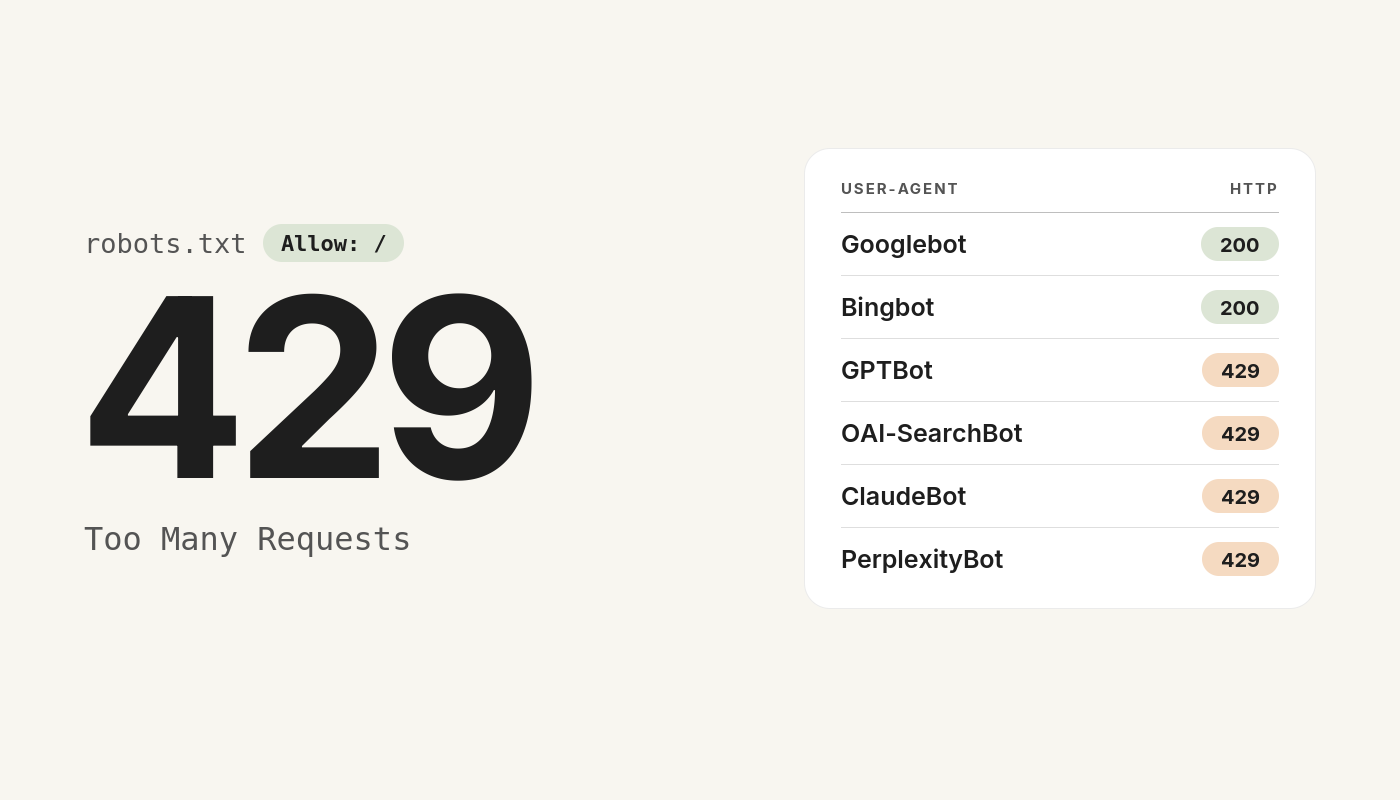
We received an email: “ChatGPT does not know your company.” We checked, and it was true — but for a reason the sender had not anticipated. The server was turning AI crawlers away with a 429 error even though robots.txt welcomed them. Here is how we found the cause, and how to run the same check on your own site in a quarter of an hour.
Messages like that land in inboxes regularly. The sender claims to have checked how visible your company is to AI assistants, reports that the result was poor, and offers a free audit along with some ready-made "expert materials". They usually go straight to the bin.
This time we verified the claim itself. It turned out to be accurate — though the cause lay somewhere entirely different from what the sender implied, and no content marketing service would have removed it. Below we describe how we found it, and show how to run the same check on your own site.
A new channel, old assumptions
More and more people no longer type questions into a search engine — they ask an assistant. "Who carries out digital accessibility audits?", "which company can train our team on WCAG?" The answer comes back as a ready-made recommendation naming two or three firms. If your organisation is not among them, you never make the shortlist.
For an assistant to name your website, it has to have read it first. That job is done by programmes called crawlers, or bots, and each provider has its own. OpenAI uses GPTBot and OAI-SearchBot, Anthropic uses ClaudeBot, Perplexity uses PerplexityBot, Apple uses Applebot. Each one visits your site much as a browser would and stores what it sees.
Two conditions have to be met — and this is where the trouble starts, because most guides mention only the first.
Permission is not the same as access
The first condition is permission. The robots.txt file in your site's root directory tells bots what they are allowed to do. It is only a declaration, though — a polite request that well-behaved bots honour.
The second condition is actual access. Even when robots.txt rolls out the welcome mat, the server itself can refuse to serve the request. This happens one layer down, before the site even starts running, and it looks like an ordinary error:
- 403 Forbidden — the server recognised the bot and refused
- 429 Too Many Requests — the bot exceeded a request limit
- 503 Service Unavailable — the service is temporarily unavailable
- A CAPTCHA or verification page — the bot gets a form instead of content
These two layers can contradict each other, and nobody will tell you. No warning appears in your analytics. SEO tools will not catch it either, because they check your site while identifying themselves as a browser. You find out only when someone asks an assistant about your industry and hears your competitors' names.
What it looked like in our case
We started with the usual suspects. On that front our site turned out to be better prepared than a typical company website:
- a
robots.txtwith an explicit list of 24 AI bots, each granted full permission llms.txtandllms-full.txtfiles — a description of the company and its services written specifically for language models, in both Polish and English- schema.org structured data:
OrganizationandProfessionalServicetypes, with company registration numbers and aknowsAboutfield naming accessibility audits, WCAG 2.1 and 2.2, EN 301 549 and the European Accessibility Act outright - a sitemap with more than 500 addresses
In other words, everything usually recommended had already been done. And still the site did not appear in assistants' answers.
The test that explained everything
We decided to visit our own site the way a bot does. One command is enough: it fetches the page while identifying itself as a specific programme — here, OpenAI's crawler:
curl -A "Mozilla/5.0 AppleWebKit/537.36 (KHTML, like Gecko); compatible; GPTBot/1.2; +https://openai.com/gptbot" -I https://yourdomain.com/The result was unambiguous. The same addresses, requested at the same moment, by different programmes:
| Who visits the page | Server response |
|---|---|
| Web browser | 200 — full page, 113 kB |
| Googlebot | 200 — full page |
| Bingbot | 200 — full page |
| GPTBot (OpenAI) | 429 — 17 bytes of error |
| OAI-SearchBot (ChatGPT search) | 429 |
| ClaudeBot (Anthropic) | 429 |
| PerplexityBot | 429 |
| Applebot, Amazonbot, Meta, YandexBot | 429 |
| A made-up, non-existent bot | 200 — full page |
The last row is the most revealing. An invented name passed through without obstacle, while the named AI crawlers were turned away. So this was not a load limit at all — it was a list of names.
One detail proved especially perverse: the robots.txt file loaded perfectly well. The bot read a courteous "come in, everything is permitted" and then hit an error on every real page. From its point of view the site existed but was empty.
Where the 429 comes from
The cause was rate limiting — a cap on the number of requests — operating at server level, in the ModSecurity module. Hosting providers enable it by default, and they have good reason to: crawlers can generate enormous traffic, and on a shared server one aggressive bot slows everyone down.
The trouble is that the default list makes no distinction between bots that merely consume resources and bots that are now a route to your customers. Googlebot and Bingbot are often exempted as verified crawlers; everything else goes into the same bucket.
It is worth stressing: this is not the hosting provider's fault or a bug. It is a sensible default, established before AI assistants became a sales channel. It simply needs to be adjusted deliberately.
How to check your own site
You need curl, which ships as standard with Windows, macOS and Linux. Open a terminal (on Windows, PowerShell) and paste the commands below, substituting your own address.
Step 1. A baseline — an ordinary browser.
curl -o nul -s -w "%{http_code}\n" https://yourdomain.com/This should return 200. If it does not, you have a bigger problem affecting every visitor.
Step 2. The same request, but as OpenAI's bot.
curl -A "GPTBot/1.2 (+https://openai.com/gptbot)" -o nul -s -w "%{http_code}\n" https://yourdomain.com/Step 3. The remaining crawlers. Repeat step 2, replacing the name after -A with each of: OAI-SearchBot, ClaudeBot, PerplexityBot, Applebot, meta-externalagent.
How to read the result:
- 200 — fine, the bot receives the page
- 403 — the server is blocking the bot outright
- 429 — the bot is hitting a request limit
- 503 — service unavailable, often another form of blocking
- 301 or 302 — a redirect; check where it leads
Step 4. Check that the limit does not come back. A single successful request proves little — rate limiting by definition kicks in only after several. Fetch a dozen or so different pages in a row as the same bot and confirm that all of them return 200. A real crawler visits hundreds of addresses.
Step 5. Compare the content. It happens that a bot receives a 200 but a stripped-down version of the page. Save both versions to files and compare their size — they should be close.
Where to find the setting
Shared hosting with a DirectAdmin panel often has a dedicated section for AI bots, containing three layers that are easy to confuse:
- AI bot control — whether the bot is admitted at all
- robots.txt settings — what we declare to bots
- Rate limiting (ModSecurity) — how many requests a bot may make
In our case the first two were set correctly and the entire cause lay in the third. If your panel has no such section, write to your hosting provider — quote the specific bot names and the result of your curl test. It speeds the ticket up considerably.
Which bots to admit, and which not
We do not recommend disabling protection for everything. A sensible split looks like this:
| Bot | Decision | Why |
|---|---|---|
| OAI-SearchBot, GPTBot | admit | ChatGPT's search and knowledge base |
| ClaudeBot, PerplexityBot | admit | further assistants with a growing share |
| Applebot | admit | Siri and Apple search |
| meta-externalagent | admit | Meta AI |
| facebookexternalhit | admit | not an AI bot at all — it fetches link previews on Facebook, Messenger and WhatsApp. With the limit on, a bare address appears instead of a thumbnail and title |
| AhrefsBot, SemrushBot, MJ12bot | restrict | SEO tool crawlers — heavy traffic, no visibility in return, and they collect data about your site for competitors |
| Fake bingbot | restrict | rules of this kind target requests impersonating Bingbot from addresses outside Microsoft's range; the genuine bot is unaffected |
What this change will not fix
After correcting the settings we repeated the whole test: every AI bot received the full page, a dozen consecutive requests went through without error, and the content proved identical to what a browser sees. The SEO crawlers remained restricted, exactly as intended.
Two things are worth bearing in mind, though.
The change is not retroactive. Assistants have to visit the site again, and that takes time — usually from a few days to a few weeks, depending on the crawler. Removing the block is visible immediately; the effect on models' answers only follows re-indexing.
Technical availability is a necessary condition, not a sufficient one. An assistant that can read your site still has to judge it worth quoting. Clear descriptions of your services, concrete company details, substantial content and mentions in other sources all matter. But none of them works if the crawler receives an error message.
And that is the point of the whole story. Had we bought the "expert materials" offered in that email, the problem would have remained exactly as it was. There was no shortage of content — there was no way to read it.
Checklist
- Use
curlto check what response code GPTBot, OAI-SearchBot, ClaudeBot and PerplexityBot receive - Repeat the test across a dozen or so consecutive pages to rule out a request limit
- Compare the size of the page received by the bot and by a browser
- Open your hosting panel's rate limiting section and see which bots are restricted
- Verify that
robots.txtreally does permit the bots you care about - Make sure
facebookexternalhitis not restricted if you share links on social media - Repeat the whole check after any change of hosting, migration to a new server, or activation of a CDN or new bot protection
The whole thing takes a quarter of an hour, and it can explain an absence that shows up in no statistic at all.